Cord Cutting Cost Update

Unlike my lengthier Cord Cutting and Cost Cutting posts of 2018 and 2020, this is just a quick update on what I’m currently paying for streaming, internet, phone, security and other online services to help gauge how these have changed over the last few years in the greater Houston area. (Please refer to those previous posts for details, comparisons and rationales.) Monthly costs listed below include all fees and tax. A little over $200/month for all of these services is less than some friends pay for satellite or cable TV/phone/internet packages with Comcast, Verizon, or (perhaps worst of all) AT&T. So, I’m thinking cord cutting cuts costs along with improving choice.

Provider & Service NameService TypeMonthly Cost
Comcast Xfinity cable (400 Mbps)Internet Broadband$50
Apple One Premier
• Music
• TV+
• Arcade
• iCloud (2TB)
• News+
• Fitness+
Bundle
• Music
• Video Streaming
• Games
• Cloud Storage
• News & Magazines
• Fitness Videos
$32
Amazon PrimeBundle
• Fast Shipping
• Video Streaming
$11 ($120 annually)
Disney+Streaming$7 ($80 annually)
HBO Max (ad-free)Streaming$16
PBS PassportStreaming$5 (donation)
YouTube Premium Family (ad-free)Streaming$25
SiliconDust HDHomeRunBroadcast TVFree
SiliconDust HDHomeRun DVRBroadcast TV DVR$3 ($35 annually)
Audible Premium PlusAudiobooks$16
Mint Mobile (10GB/month)Mobile Phone$22 ($240 annually)
Google Voice with OBi200 (VoIP)Home PhoneFree
ADTHome Security$22
TOTAL$209
Monthly Cost Summary Table

Transparency and Privacy

If you like your privacy, and controlling if and how online companies track you, you should like Apple devices. Of the biggest tech companies–including Amazon, Google, Microsoft and Facebook–Apple is the most privacy focused. They can afford to be “the privacy company”, given they make most of their money selling you hardware (with high margins), and they’re betting privacy is of great value to Apple customers. Some companies make money selling your history and preferences to advertisers, political groups, or more malicious organizations. Apple does not, and is helping you fend off those who do. Here are a couple recent examples of Apple’s focus on user privacy and transparency in data tracking.

App Tracking Transparency

Apple updated iPhone and iPad operating systems (iOS and iPadOS) to version 14.5 this week. Once you update your device to 14.5 (and you definitely should…right now…go ahead, I’ll wait), you’ll likely see more pop-up windows asking whether or not you’d like to allow your Apps to track you and your data. It may seem annoying at first, but the messages or short, simple, and welcome assuming you value awareness and control over your own data and privacy. Apple calls it App Tracking Transparency, and describes it in this short Apple video. For even better understanding, check out this 8-minute Wall Street Journal video in which Joanna Stern talks with Apple Software Engineering Senior VP Craig Federighi about the transparency & privacy features in iOS 14.5 and how they counter App & ad tracking.

App Privacy

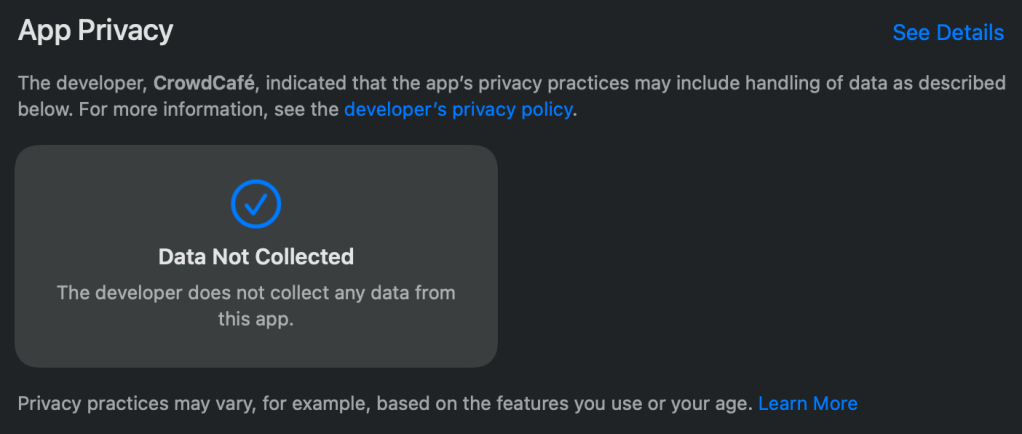
If you’ve opened the Apple App Store recently on your iPhone, iPad or Mac, you may have noticed a new App Privacy section below Ratings & Reviews on any App page. In this area, Apple asks App developers to openly declare what data they collect on users who download and use their App. Some Apps don’t track you, and will say “Data Not Collected” in App Privacy, as shown below for Magnet for Mac.

Magnet collects no data

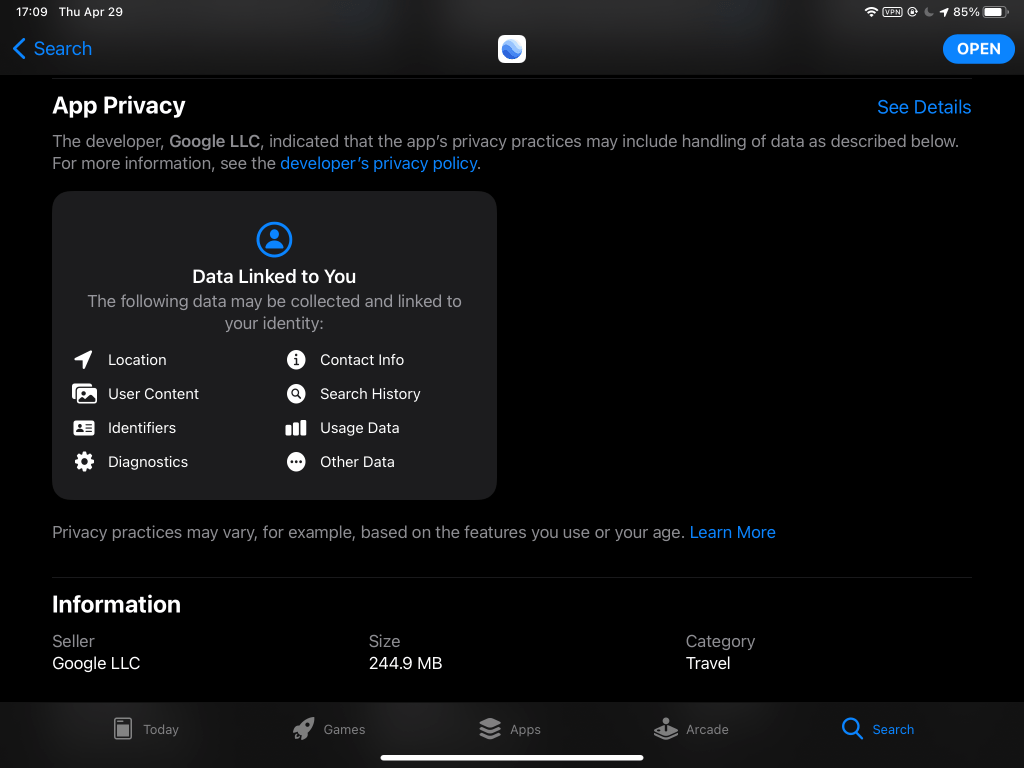
Unfortunately, some companies use their Apps to harvest a lot of your data, even data their Apps don’t need to work, often in order to sell your data to other companies or government agencies. Below is the App Privacy section for Google Earth for iPad. It makes sense that Google Earth might need your Location to place you on the Earth, but does it really need your Contact Info? Clicking on See Details shows what Other Data of yours is tracked by Google.

Google Earth collects much data

For over a decade, Apps simply took your data and sent it to online company servers for monetization, mostly without your knowledge. Technically, they had your consent since you tapped OK or Accept buttons at the end of absurdly long User License Agreements (ULA) that no one other than a corporate lawyer ever reads or understands…you remember agreeing, right?! Sneaky App developers count on your unwitting complicity in surveillance business models. Now, Apple is simply asking them to tell you what data they intend to collect before you download their Apps, and then to ask permission for data access when you first use their Apps on your device.

Who could argue against honest transparency? Facebook, of course. Facebook attacked Apple in the NY Times and elsewhere, claiming they were “standing up to Apple”. They are against App Tracking Transparency and App Privacy, implicitly acknowledging that giving users awareness and control of data tracking is bad for Facebook’s business. Given Facebook is the most egregious privacy offender on the Internet, with a long track record of tracking, exposing and algorithmically manipulating user data and behavior, it is no wonder they fear Apple’s transparency and privacy initiatives…and the scary possibility that Google and Android phones may follow suit under public pressure, once users get a little taste of privacy. “Wait, you want us to tell users how bad we are?! What if they don’t like being spied upon, exploited, manipulated?! We can’t keep growing to over 3 billion products…er…users being open and honest with them!”

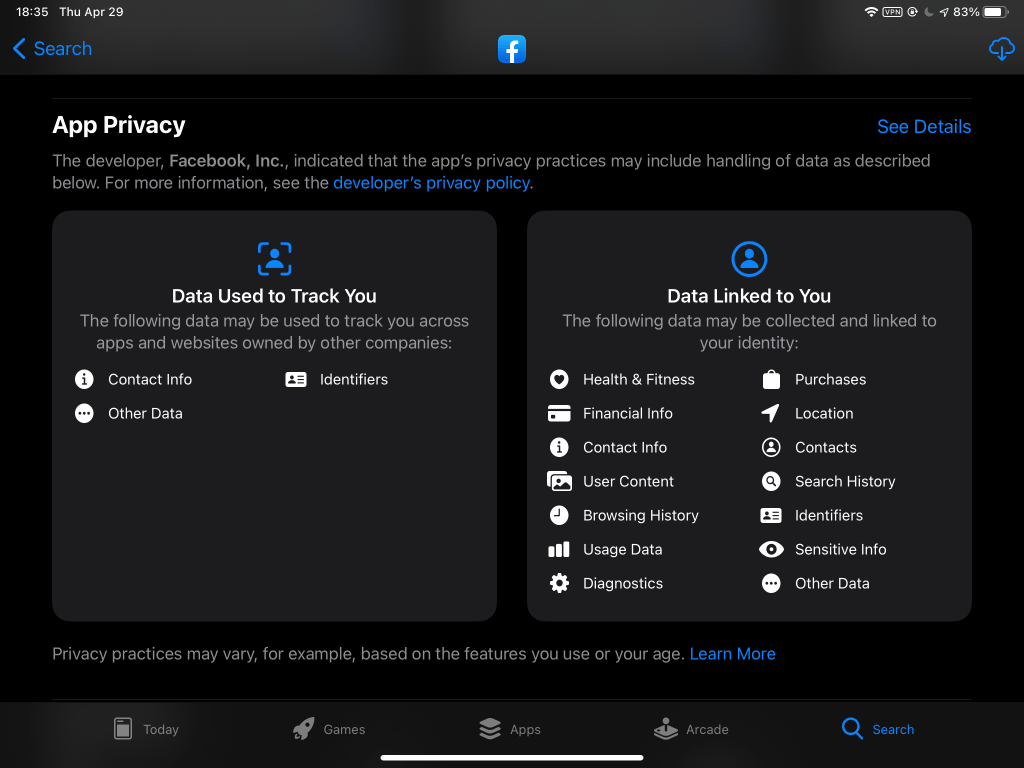
Check out the long list of your data tracked and harvested by the Facebook App below. Do you really want Facebook monitoring and selling your Health & Fitness, Financial Info, Sensitive Info?! For a real scare, click on See Details to get a very long, scrolling, detailed list of tracked data that goes on for many pages…basically, there’s not much about you Facebook doesn’t want to track, sell, and possibly lose to nefarious clients and hackers as they have a habit of doing. Yikes! Who would choose that?! This scares Facebook: newly aware users saying “NO, of course not!”

Facebook collects the most data

A NY Times article this week reports that in a 2019 conference for tech/media moguls (Silicon Valley meets Sun Valley), Facebook CEO Mark Zuckerberg–still reeling from Facebook’s Cambridge Analytica scandal breaking the year before–asked the more senior Apple CEO Tim Cook for advice on how he would handle the fallout of such a debacle. Tim told him to delete the data collected outside the core Facebook App, and stop collecting such data from his users. Mark “was stunned”, as this would undermine his user-as-product business model, and may have been his first clue that Tim would not be his ally in the surveillance economy, that Apple was tacking to the more user friendly direction of transparency and privacy. Attaboy, Tim!

Perseverance and Ingenuity

Earlier this month, after a 7-month journey from Earth, our Mars2020 mission landed the Perseverance rover on Mars in the Jezero Crater, near an ancient riverbed (yes, Mars once had thousands of rivers and lakes before the water froze, though some liquid water may still flow seasonally). If you haven’t caught up on the fantastic videos (and audio!) from this historic mission, don’t waste another second, check them out here:

  • First, in full screen mode with your volume up, watch these very cool Perseverance entry, descent and landing and Ingenuity Helicopter animations on YouTube so you understand what’s happening as early videos and images come back from Mars. The first animation starts with the quiet arrival at Mars before slamming into the Martian atmosphere at about 20,000 kph (12,500 mph) to begin “7 minutes of terror”, ending with Perseverance in a cold, desolate Martian landscape. The second animation shows the deployment and first flight of Ingenuity (in a few weeks), our first flying drone on another planet…helicopters on Mars!
  • Then watch the on-board views of descent and landing, including…
    • Parachute deployment. BTW, within hours people online had deciphered the secret message hidden in the parachute markings: using binary numbers and ASCII code, it spells out DARE MIGHTY THINGS, a quote from Teddy Roosevelt and informal JPL credo, as well as some significant coordinates
    • Heat shield jettison, after it protected the lander from atmospheric entry temperatures up to 1300 °C (2370 °F)
    • Back shell (with parachute) separation from the rocket-powered Sky Crane
    • Sky Crane lowering of the big, SUV-sized Perseverance rover to the surface
  • Take your time browsing around the NASA Mars 2020 Perseverance Rover main site offering links to other images, videos, audio, animations and info
  • Come back weekly to check out the latest Mars images sent back by Perseverance, including the public choice for Image of the Week

You might be wondering why we don’t get real-time 4K HD video streaming from Mars. After all, Perseverance has high-tech sensors and cameras, and clearly is able to send back cool images and videos. What it lacks is a broadband connection back to Earth. Think of it as your slow internet connection 20 years ago, when you could browse the early web and (slowly) download files, but today’s live HD video streaming was not an option. It takes a while for Perseverance to transmit data, images and video back to Earth, even going through the Mars Reconnaissance Orbiter (MRO), and those signals take up to 20 minutes to reach us, even traveling through interplanetary space at the speed of light.

Go Perseverance and Ingenuity!

Post Truth

Social Dilemma

The Social Dilemma, a Netflix “documentary-drama hybrid,” does an impressively good job describing visually, dramatically, and in simple, understandable terms to a non-techie audience (e.g., your Facebook-addicted elderly relatives) the dangers posed by global social media networks like Facebook, Twitter and YouTube upon ourselves and our society. The entertainingly educational 90-minute movie shows how largely unfettered machine learning algorithms on these sites manipulate and addict you with one goal: keep you engaged as much as possible (whether enthralled or enraged matters little), clicking and tapping, so they can charge advertisers more for a larger user base, and they gain ever more data on your behavior, preferences and emotional triggers to sell to advertisers and to fine tune your targeted, individualized manipulation and addiction in an endless spiral. As the modern saying goes, if you’re not paying for social media, you’re the product, not the customer.

The Social Dilemma relies upon expert insiders–some of them responsible for creating the algorithms that learn to hook you–and fictional families to explain and dramatize how the relentless, amoral pursuit of growth by social media giants led to giant social problems, such as enabling mass manipulation by advertisers and propaganda peddlers on an unprecedented scale, connecting and emboldening conspiracy theory cranks and bad actors around the globe, giving foreign adversaries cheap-n-easy direct access to US voters for disinformation campaigns, and offering authoritarian regimes tools for surveillance, control and even genocide. It has never been easier to grow the ranks of flat earthers, climate science deniers, anti-vaxxers, Qanon believers, white supremacists, and angry mobs than now when Facebook/Twitter/YouTube algorithms lead susceptible users down dark rabbit holes of misinformation, successfully increasing engagement as “outrage machines.” The docu-drama spends a lot less time on detailed solutions to these urgent problems, though it does touch on a bunch of tips for average users at the end (e.g., turn off notifications, limit your screen time, delete the phone app, or simply delete your account). I highly recommend checking it out on Netflix (whether you already subscribe or just want to try it for a month) for your own education and awareness. As a target for manipulation, you should learn how it works so you can recognize and fend it off.

Confronting Misinformation

I first read Scientific American in the late 70’s, when my step-dad subscribed to it. I later subscribed myself, first in paper then digital, before more recently getting it as part of my Apple News+ subscription (along with Wired, Motortrend, National Geographic, Rolling Stone, and many others…not a bad deal). The November issue focuses on Confronting Misinformation: How to protect society from fear, lies and division…quite timely given the rising tide of misinformation in recent and current campaign seasons.

With The Social Dilemma still on my mind, one of the November SciAm features in particular caught my eye: Trolling for Truth on Social Media, by Joan Donovan, a social scientist faculty member at the JFK School of Government at Harvard University. Her article harkens back to a simpler time in the late 80’s and early/mid 90’s, long before your senior relatives had even heard of the Internet, when going online meant you were at college (.edu) or work (.com or .gov), or later at home with a dial-up modem commandeering your only phone line, when we early adopters shared files, software, technical info, homework and perhaps some dialog in usenet groups and early email accounts, but not personal data, and we certainly didn’t buy anything online. Many viewed the rapidly expanding Internet clad with the newly accessible World Wide Web as a public tool for information and democracy…hello world, you’re welcome! Dr. Donovan traces our online history from those naively idyllic beginnings into the modern digital economy, first driven by porn (like VHS in the 70’s), later by more general sales sites, eventually by social media giants who figured out how to convert users’ personal data into a marketable commodity, for sale to other corporations, political organizations, and even governments. Agencies in the latter figured out how to use social media to surveil and manipulate people in other countries, and even their own citizens. Dr. Donovan describes some of the tactics used by these good and bad actors, for good or ill.

While I enjoyed the walk through the digital history of the last few decades and learned some tricks of the trade, I awaited the punch line at the end, when she speaks to how those who still care about truth and public access to it might fight back against the online flood of dis/misinformation around the world and here in the US. It starts by losing our naïveté and “dispatching with the ideology that technological platforms are democracy in action.” By design, social media and misinformation incentives are “weighted in favor of disinformers,” given “novel claims travel far and fast,” racing past and drowning out boring old truth. If such harmful incentives are inherent in the current design of social media, a redesign is in order, i.e., design to incentivize truth over dis/misinformation, or at least to achieve a better balance for a more “equal-opportunity media ecosystem.” Our “techno-nostalgia” and era of laissez-faire attitudes toward the Internet and the global media/information companies that use it must come to an end if we are to rescue truth on social media for our own social and democratic health.

Cost Cutting

In 2018 I wrote about Cord Cutting, my experience dropping my overpriced DirecTV satellite TV service several years ago and relying solely upon Internet TV & movie streaming services. Cord cutting saved some money, but was also about choice, chasing the a la carte TV dream: only paying for what you want rather than 500 channels of useless crap, and turning services on and off monthly as needed rather than being stuck in bloated long term contracts. (That post remains mostly applicable two years later, though all of the quoted costs have increased.) As the COVID-19 pandemic spread worldwide early this year, like many people I focused on cutting costs, trimming the fat from monthly bills, subscriptions, and online services. So, Cost Cutting is an update to Cord Cutting, providing a few ideas on how to save more than a few bucks, especially for those unfortunate souls still overpaying an “Evil Corp” (the likes of Comcast, Charter, DirecTV, AT&T or Verizon) for TV/phone/internet bundles. Time to go all Marie Kondo and streamline your connected life!

Streaming Apps & Online Subscriptions

First, I saved nearly $60/month by dropping Hulu (no ads), Sling (Orange + Sports Extra) and Netflix (Premium 4K). I only had Hulu for late-night comedy/talk shows (watched in the morning over coffee and breakfast) and The Handmaid’s Tale. My wife found the latter too depressing (fascist religious fanatics take over US Gov…a little dark), and I could record the late-night shows with my HDHomeRun Extend box, cheap antenna, and $30/year (<$3/month) HDHomeRun DVR service. I was only using Sling for watching sports on ESPN (1, 2 & 3) and the Tennis Channel (w/ Sports Extra), so once the pandemic shut down most sports, turning off Sling was a no-brainer. Despite enjoying Patriot Act on Netflix, I found it was easy to let the red N go as well. Last month we restarted Netflix for the final season of the sci-fi series Dark (so German), and my sister Claire’s recommendation, the dark comedy Dead To Me (Christina Applegate is great…who knew?!), but having finished those, we’ll probably turn it off again. I kept these subscriptions and apps:

  • HBO Max: $15/month, formerly HBO Now
  • Apple TV+: free for a year with recent device purchase (otherwise $5/month)
  • Disney+: $70/year = $6/month, mainly for Star Wars, Marvel & Pixar movies, not to mention Jeff Goldblum and, of course, Baby Yoda on Mandalorian
  • Amazon Prime Video: included with Prime Membership ($120/year = $10/month)
  • PBS Video: free by default, though I donate $5/month to PBS for their excellent catalog
  • Comedy Central, 60 Minutes, TED Talks, video podcasts and YouTube videos, all free (with ads)

Next, I reduced my Audible audiobook subscription from Gold at $15 for 1 book credit every month, to Silver at the same price every other month, saving ~8/month. (All those books in my GoodReads list at right were audiobooks, so it really should be GoodListens.) I mainly listen to books with my iPhone while driving, so my audiobook listening time plummeted along with car time due to teleworking, and books took longer to finish. In fact, I later canceled Audible altogether (still keeping purchased audiobooks), though I recently restarted again to replenish my unread/unheard library. If you’re new to Audible, you’ll likely see only Gold and Platinum membership options, and wonder how to get the cheaper Silver. The answer is to use the same leverage you have over all monthly subscriptions and services: threaten to cancel. As soon as an Audible member clicks to cancel their subscription, the Audible site tries to keep you by offering lower cost alternatives such as the “secret” Silver level. Sneaky bastards to be sure, so you have to know how to play the game.

Internet Service

With little competition at the high end of broadband service, cable is still the best Internet option in our area. The growth of optical fiber networks (e.g., Google Fiber or Verizon Fios) has slowed to a crawl in the US, hasn’t reached our neighborhood, and DSL generally remains a slower, less reliable choice (you can only get so much out of a twisted pair of skinny copper wires). Perhaps Elon Musk’s Starlink constellation will help disrupt/bypass cable Internet with fast-n-cheap satellite access, but that literally just got off the launch pad. Cable companies such as Comcast and Charter pay…er…lobby legislators hard to keep their local monopolies on cable service, so for us, cable = Comcast.

I dropped my Comcast Internet bill from >$90 to $50/month by dropping my speed from 200Mbps to 75Mbps (speed tests show we actually get 90Mbps most of the time), which is sufficient for 2 non-gamers streaming simultaneously (a large family with gamers may need more shared bandwidth). Since 2018, Comcast finally stopped forcing a TV/internet bundle to get the best Internet price, acknowledging that many people no longer want their bloated TV packages. So, I now pay Comcast the minimum for Internet access only (forcing the switch from HBO Go to HBO Now/Max noted above). I call Comcast about once a year to make sure I have their cheapest Internet option, since they’re always changing options and prices. Comcast phone reps sometimes have access to options not shown on their web site, so ya gotta call. Of course, I always purchase my own cable modem (currently a Motorola MB7621), which is much cheaper than renting Comcast’s Xfinity modems.

Mobile Phone Service

In the Before Times, pre-pandemic, we were paying AT&T over $50/month (>$600/year) for Varya’s iPhone service, capped at 1GB of data. Years ago AT&T hit us with over-charges for exceeding that monthly cap when she accidentally left her phone on streaming music videos all night. We long ago switched her to an AT&T plan that simply slowed down above the cap rather than inflating the bill, but I was always on the lookout for a better alternative to AT&T. Enter Mint Mobile (thanks to Uncle Leo’s TWIT.tv network). Now for only $180/year = $15/month (!), she gets 3GB of data, far more than she ever uses in a month. If we paid Mint $25/month, half as much as we used to pay AT&T, she’d have 12GB, an order of magnitude more than AT&T’s low limit. The catch? Mint licenses the T-Mobile network, so you have to be in an area with good T-Mobile coverage, typically in or near cities. Fortunately, Varya gets great coverage in the greater Houston metro area, including driving downtown to work. When my Mom tried Mint, she found T-Mobile’s coverage was spotty out in the sticks of Misery…er…Missouri, so she returned to AT&T at over 3 times the price for their larger cellular network. (BTW, if you’re not too rural and want to try Mint Mobile, we both get a little bonus if you use my Mint referral link: http://fbuy.me/pFeNf)

Home Security Service

Your home security system is another often overpriced monthly service open to negotiation. When we bought our home in 2012, I signed up with ADT, locking myself into a 1 or 2 year contract at ~$45/month (silly boy, that was too high!). After the contract expired, I called ADT about the price, and they happily dropped it to ~$25/month…apparently they had a helluva profit margin to play with! Every year or two they’d increment the price, and when it got too high I’d call again to bring it back under $30/month. This year it increased to $36, and last month they sent an email suggesting it would increase again to $39. So, I called to cancel the service—remember, the threat of cancelation is always your best negotiating tool with any monthly service/subscription! They offered a “special pandemic price” of $15/month to keep me, and said I could ignore the price increase email…effectively acknowledging their recent price increases were BS, just squeezing extra profit out of loyal customers, assuming most wouldn’t notice or take action. In the increasingly competitive home security market—DIY newcomers like Ring Alarm and SimpliSafe are as low as $10/month—old companies like ADT must adapt to remain viable.

Bottom Line

How does all of that tally for my monthly costs? As of right now—and I could easily change it at any moment, which is what I love about cord cutting—my monthly pre-tax bill for all TV, audiobooks, Internet, cell phone, and monitored home security is $133 = $15 HBO Max + $16 Netflix Premium + $6 Disney+ (paid annually) + $5 PBS Video (donation, not required) + $3 HDHomeRun DVR (paid annually) + $8 Audible Silver + $50 Comcast Xfinity (75-90Mbps) + $15 Mint Mobile (paid annually) + $15 ADT Security. I may drop the $16 Netflix Premium, but restart the ~$30 Sling/ESPN/Tennis Channel for the US Open at the end of August, adding a net ~$14 this month, still keeping everything under $150. I don’t count Amazon Prime Video because I pay for Prime Membership for free 2-day shipping of my Amazon purchases and rarely watch their video service. I’m also not counting online movie rentals, because those are independent of streaming services—we typically use Apple TV to rent movies, but could easily use Prime Video, Vudu, or many other options at about the same cost per rental ($1-7). My “land line” phone service is free using Google Voice with an OBi200 VoIP box (and rarely used anyway).

So, the bottom line is that if you’re paying anything near or over $200/month for TV + DVR + Internet + audiobooks + cell & home phone + home security—or worse, just a subset of those—the bad news is you’re probably wasting money, and the good news is you have opportunities available now for cutting costs, maybe by half. Even if you’re afraid you’re not tech savvy enough to try cord cutting and managing various services a la carte, at the very least call your provider and say you want to cancel your bundled services due to cost—you’ll get transferred to a “retention specialist” who’s professional mandate is to keep you as a customer and thus who has the power to offer you deals and lower prices the first-line phone rep can not. Feel free to use any of the costs I quoted above as negotiation leverage…as I did by mentioning SimpliSafe to ADT. 😉

[2020-08-31 Updates: I recently called Comcast and dropped my Xfinity Internet plan to $45/month while increasing the quoted speed from 75 to 100 Mbps. This was one of the first times that the deals offered by the phone rep matched those offered online in my Comcast account, i.e., it would have been faster to change my own service online, since my Comcast guy was confused and slow. Meanwhile, Audible dropped the precious metal nomenclature, and now calls their top service Premium Plus ($15/month) and their lower level just Plus ($8/month). With Premium Plus, you own your audiobooks, whereas with Plus it appears you can only access them as long as you maintain your membership…not good. Both have an option to pay annually with a discount. Selecting the “Cancel membership” option no longer unlocks a secret half-price option, but rather enables you to pause for up to 3 months. This may work out even better than the old Silver/half-membership option if I can pause for 3 months, turn it one for 1 month and repeat this cycle, effectively having a 25% membership option.]
Family Sharing

Family members added to my Apple Family Sharing list get to use my purchased iPhone and iPad apps, iCloud storage, Music and News+ subscriptions and watch my purchased movies and shows, and vice versa. Instead of trying to explain this to some of my family members by phone or email (again), I thought I’d post a visual step-by-step guide for future reference by them and others.

Let’s start with my iPad home screen (below), in which I’ve highlighted Apple’s App Store, Music, News and Settings icons (your icon locations may vary). Using the same iPadOS 13.5.1 that I’m using will make it easier to follow along, so as a first step tap on Settings > General > Software Update and make sure your software is up to date; if not, go ahead and update it…I’ll wait here.

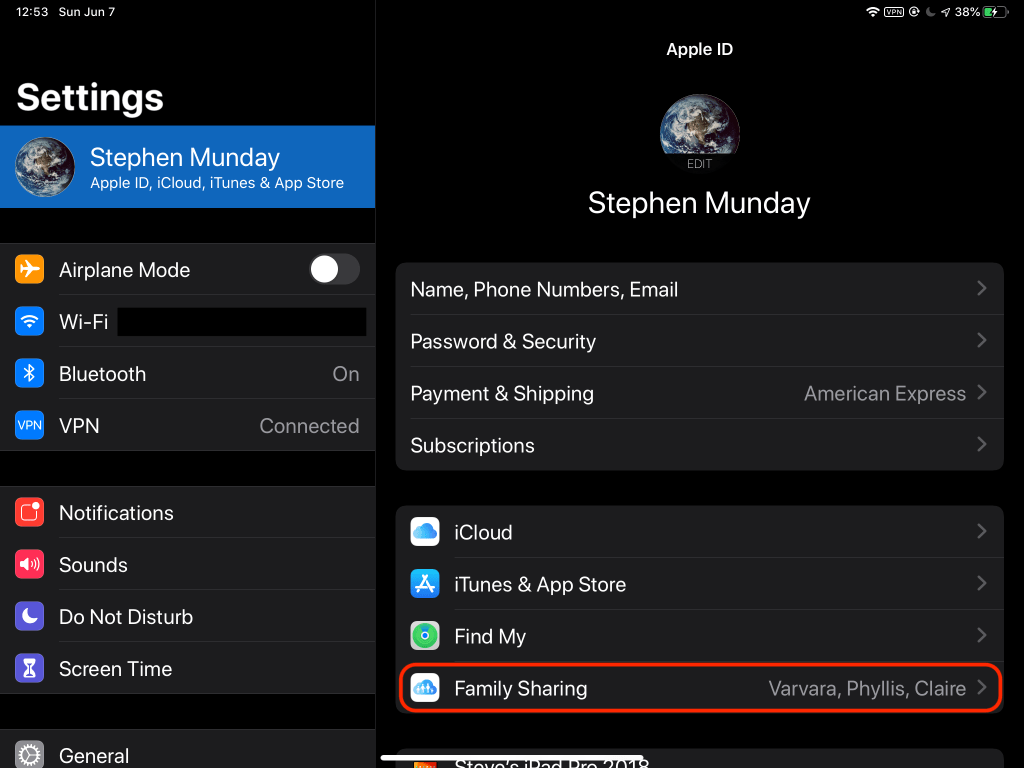
Now that our iPad software is matched, you’ll want to make sure your Family Sharing is turned on. In Settings, tap on your Apple ID/name at the top left, then on Family Sharing on the right. Below you can see that I’m already sharing with a few family members.

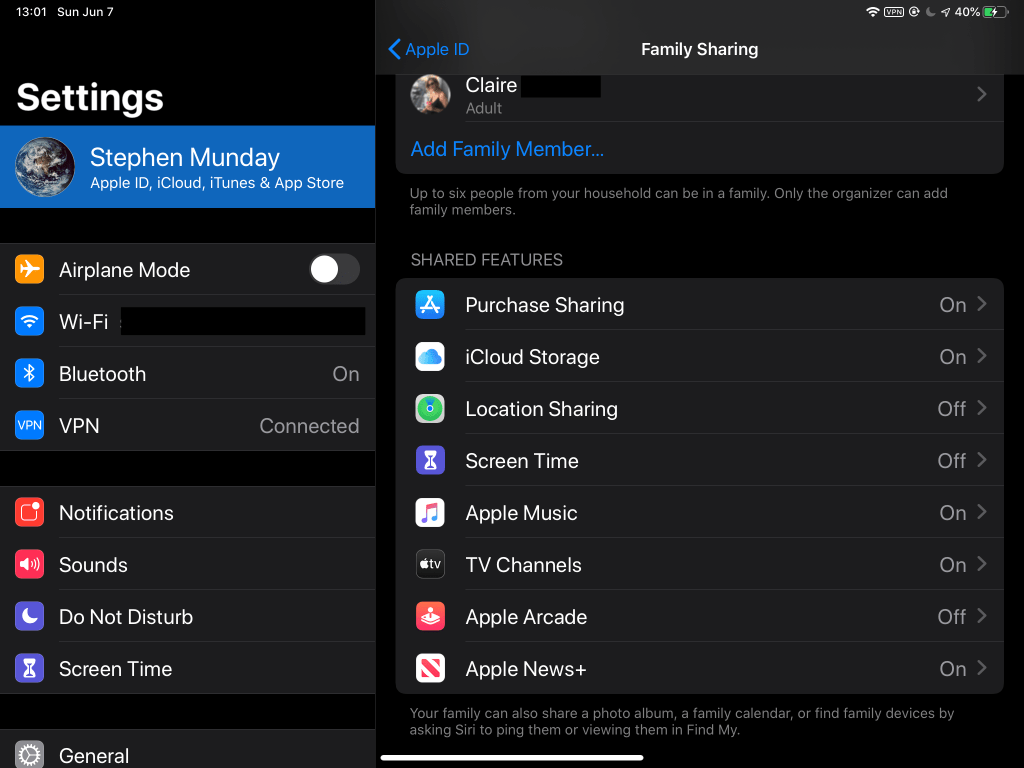
At the top of the Family Sharing window, you’ll see the Organizer (in my case, me), and any adult and child Family Members the Organizer has added, up to six people total. Scroll down and you’ll see all the available Shared Features. As shown below, I’m sharing my app purchases, my iCloud storage and Apple Music subscriptions, TV channels and movies, and my Apple News+ subscription. (I share my location on my iPhone that usually stays with me, so I have it turned off here on my iPad that usually stays home.) Go ahead and turn on your Purchase Sharing so that other Family Members can access your purchased apps.

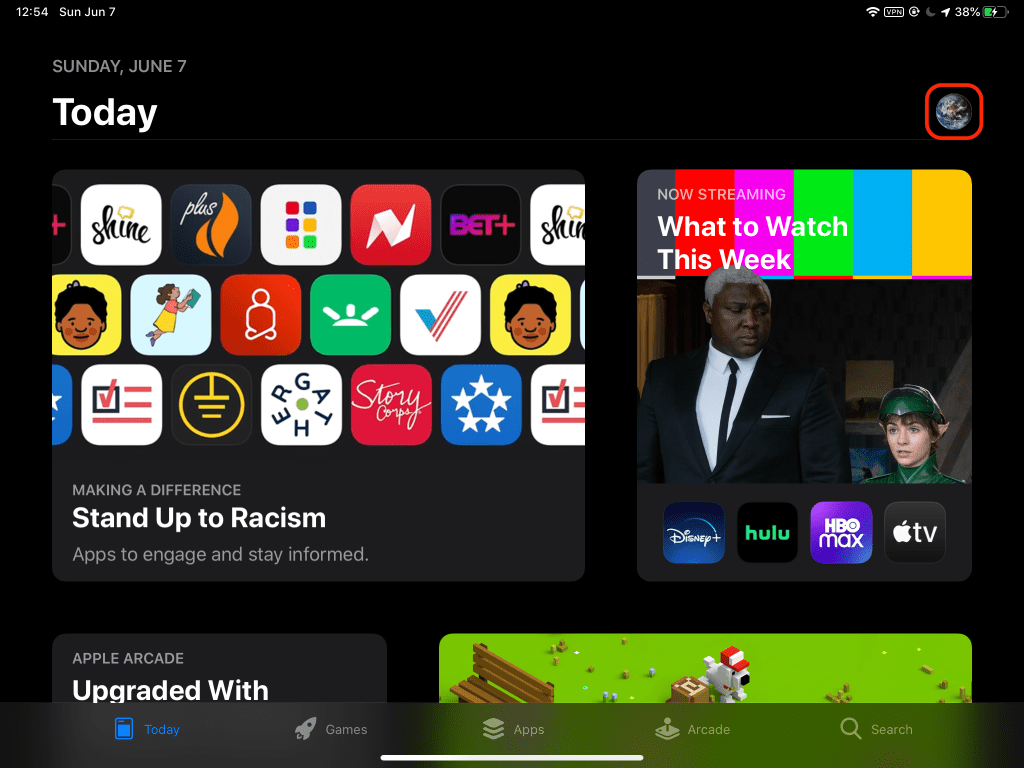
Now we’ll close Settings, open the App Store, and tap on the Apple ID icon in the upper right, in my case mother Earth (your icon may vary).

This brings up a smaller Account window in which you can tap Purchased. You could also tap Subscriptions just below that to see a list of all your active and expired subscriptions, handy for canceling subscriptions you may have forgotten about or no longer need, but that are still charging to your credit card, or to the Organizer’s card if you’re a Family Member.

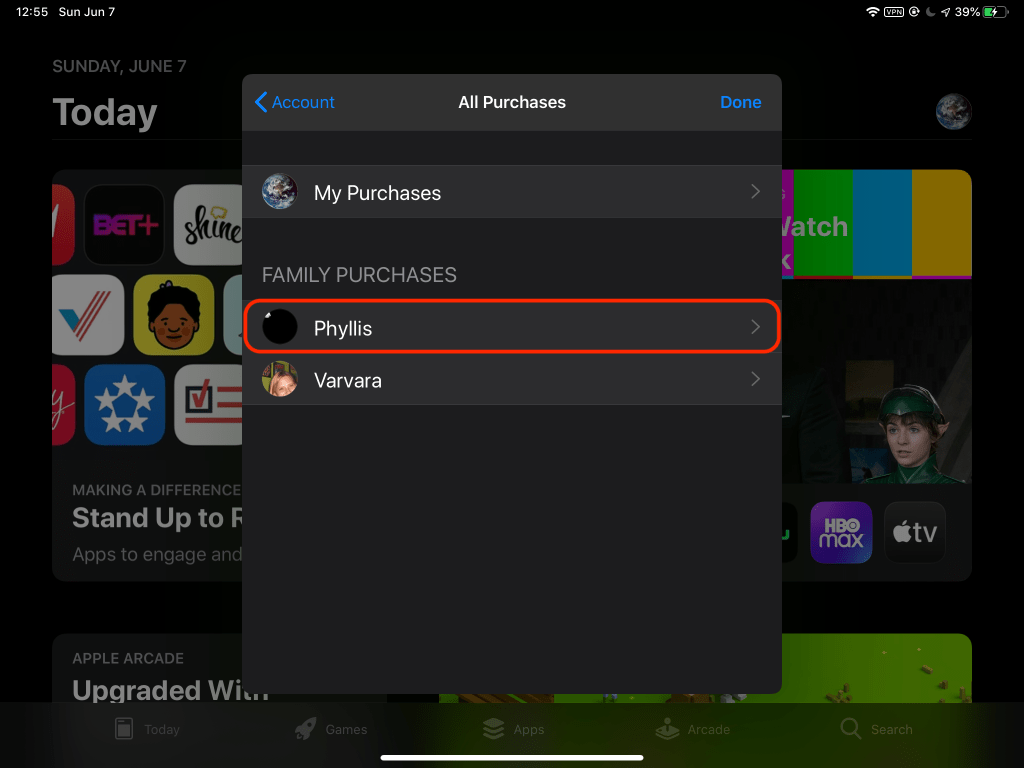
Tapping Purchased provides a choice between My Purchases and Family Purchases listing Family Members who are sharing purchases. In my case, Phyllis and Varvara are sharing purchases, while Claire is not and does not appear here. I’ll tap Phyllis to see what apps she has to offer.

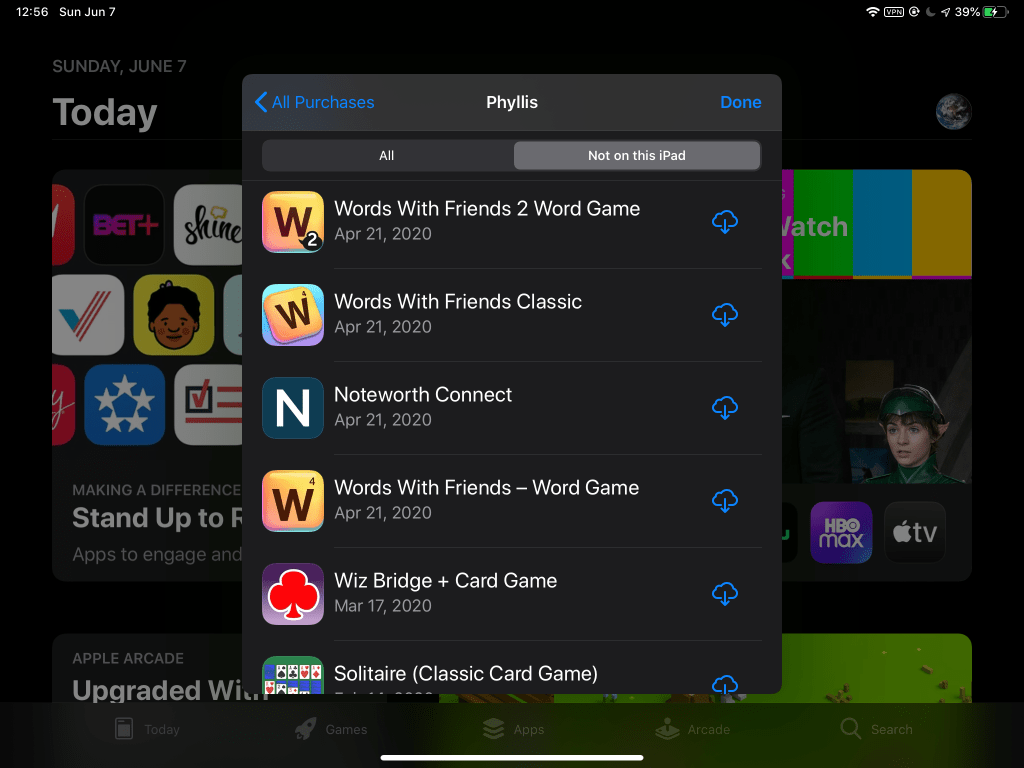
I get the scrolling list of Phyllis’ purchased apps shown below. Apparently Phyllis likes words and cards. I tap on “Not on this iPad” at the top of the sub-window to make sure I’m only seeing apps I don’t already have, apps that Phyllis bought and that I’m able to download for free from the App Store because of Family Sharing and Phyllis’ Purchase Sharing.

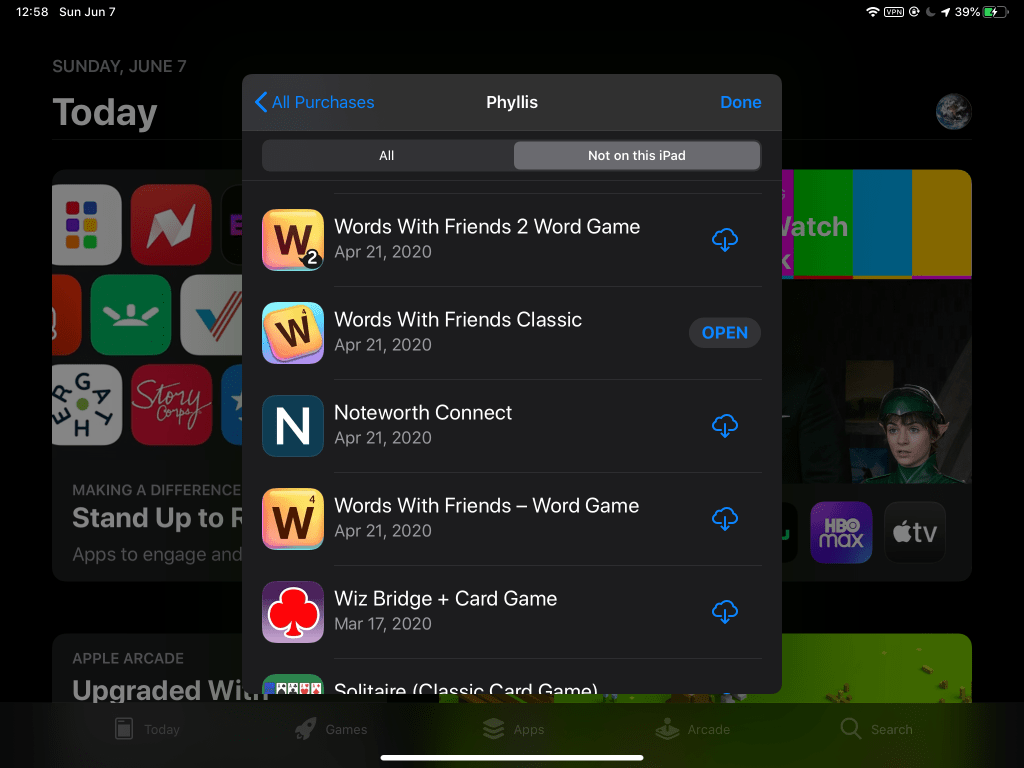
Hmmm…Words With Friends Classic…isn’t that basically Scrabble (yawn)? I can tap on the app icon on the left or title in the middle to see the app description, ratings, and other app information. Or, I can simply tap on the cloud with down arrow icon on the right to download the app immediately. The circular download progress icon appears for a few to several seconds, depending upon your broadband speed and the file size, and finally becomes an OPEN button when the app is downloaded and installed.

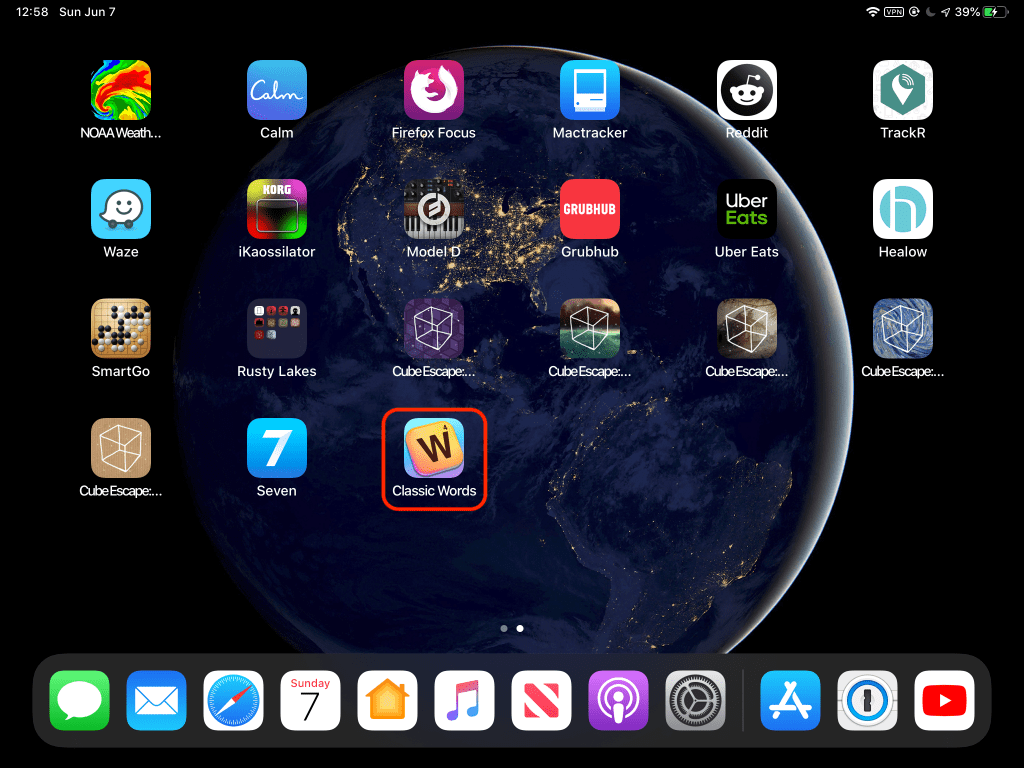
At this point, I could tap OPEN to open the app from here. Or, I could back to the iPad home screen and find and admire the newly installed app icon…then delete it because, you know, Scrabble (yawn).

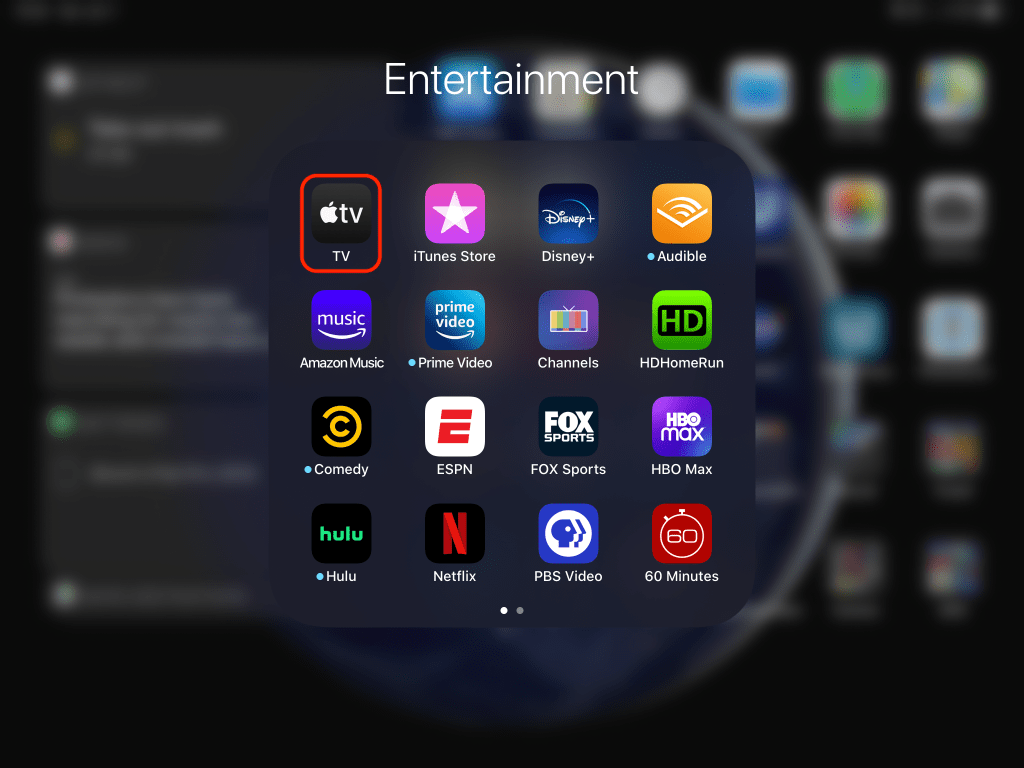
Let’s move on from shared apps to TV shows and movies. Tap and open the Apple TV app. Mine is in my Entertainment folder, but your location will vary.

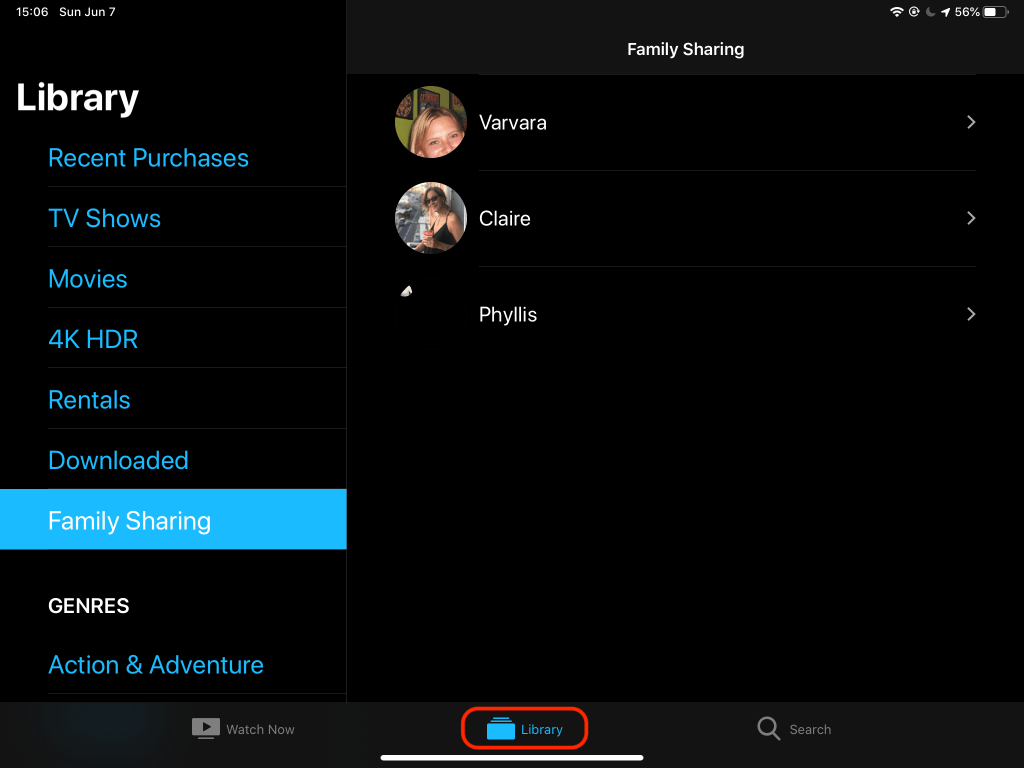
In the Apple TV app, tap on Library at the bottom, then Family Sharing on the left to see a list of Family Members who may or may not be sharing anything.

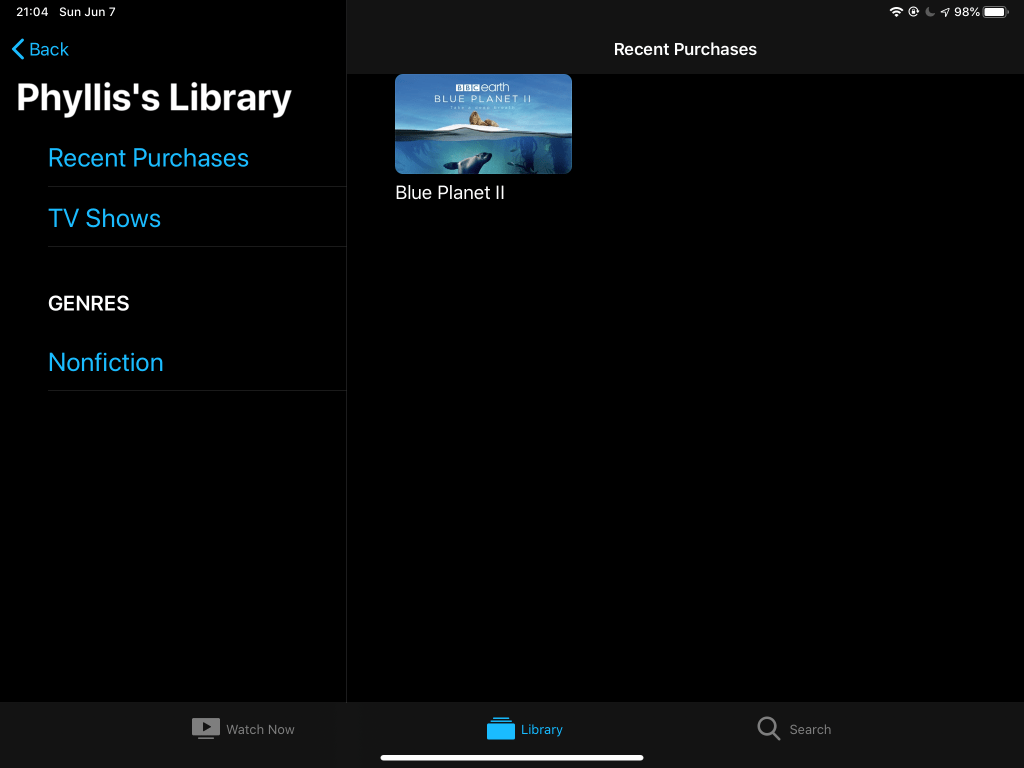
When I tap on Varvara, I get a message, “No TV Shows or Movies, Your library is empty…”, because she doesn’t buy or rent video content in Apple TV or iTunes. When I tap on Claire, I get a message, “Family Member Not Sharing, Claire is currently not sharing their purchases. They can change this in Settings.” She’s not a sharer, or inadvertently turned off Purchase Sharing in Settings > Apple ID > Family Sharing. When I tap on Phyllis, I see her entire library consisting of one Blue Planet II show trailer that I installed on her iPad as a test long ago. I could download and watch it on my iPad from here. Fortunately for my Family Members, they see a much larger selection of TV shows and movies when they tap on my name in the Apple TV app, including Apple’s original shows in my Apple TV+ subscription. (We recently enjoyed M. Night Shyamalan’s creepy Servant series in Apple TV+.)

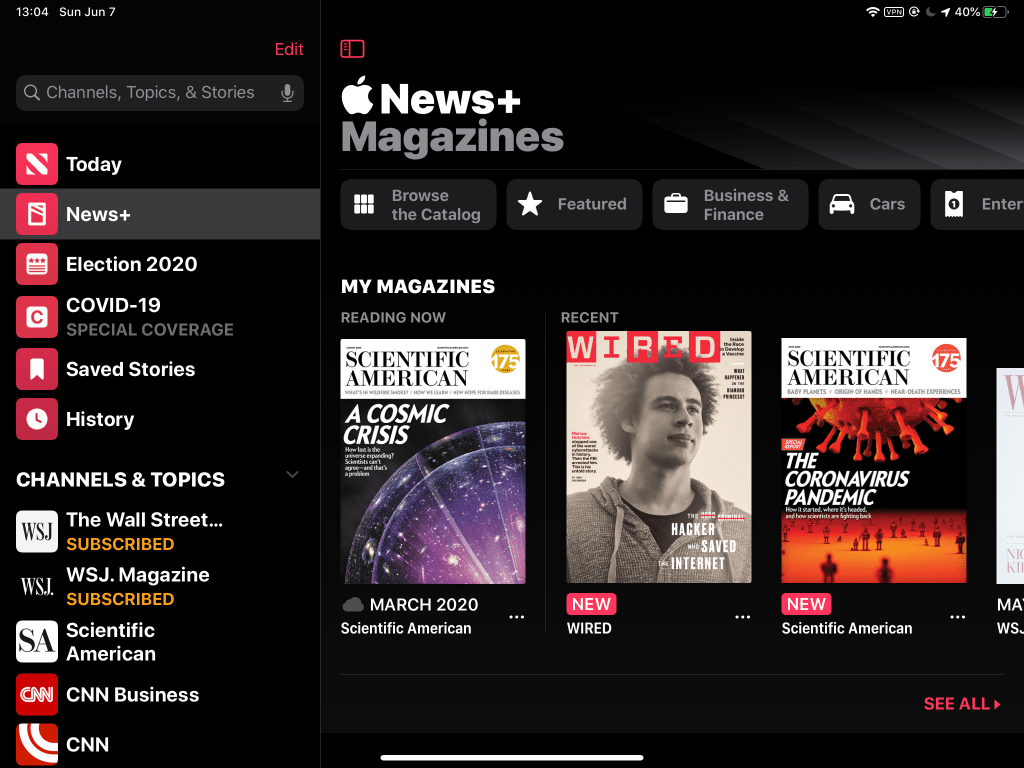
Finally, Apple Music and Apple News+ are much easier to share and use: once the Organizer has shared them, all Family Members can simply open these apps and use the subscription services. Apple Music has about 50 million songs in all genres, as well as a For You section that learns your tastes and offers playlists and artists. Apple News+ includes most major news outlets and–what really sold me–many magazines, including a few I used to subscribe to separately, but now get as part of my Apple News+ subscription. Back on the home screen, find and tap to open Apple News (stylized red N on a white icon…see the first image at the top of this post), then tap News+ on the left to browse, search and read magazines in many genres. The image below shows I like Scientific American and Wired (two of my former subscriptions replaced by Apple News+), and if you could scroll this image to the right you’d see Motortrend, Forbes, Macworld, etc.

Apple has added Election 2020 and COVID-19 as special sections on the left side of Apple News for easy access to the latest-n-greatest news on these topics of mass interest. You can add or delete channels & topics in your list if you wish, or let Apple’s learning algorithm auto-pick them for you.

That should be all you need to get started with Apple Family Sharing on your iPad and iPhone. Happy sharing.

Simply Secure

NASA and other employers have reported that cyber attacks increased dramatically with the spread of the pandemic. Apparently, internet bad guys view millions of people teleworking from home, outside protected corporate or government networks, as an irresistible opportunity for stealing data and money. So, it is more important than ever to pay attention to your own security on your phone, tablet or computer, and your most important accounts, especially bank and email accounts. Here are some simple steps you absolutely should take. (Some info is from TWiT’s iOS Today #495.)

Longer is Better

While randomizing your passwords is great, lengthening them is even better. The longer a password, the harder it is for criminals to guess, and the more time it takes even the fastest supercomputer to crack with a “brute force” attack (e.g., extending minutes or hours of computer time into years or decades, impractical). As a simple example, you could guess *** in short order, especially if you knew part of it: ca*. However, you’d have a hard time guessing ******************************, even if you knew every other letter: *a*I*T*e*a*K*o*s*L*t*b*u*T*a*! Using a long phrase like CatInTheHatKnowsALotAboutThat! gives you a long, strong password that is still easy to remember. Add dashes or underscores between words to make it even longer, and misspell some words or replace a couple letters with similar looking numbers to mix it up a bit. Just be careful typing it if you don’t use password manager software as you should (more on that later).

It should go without saying: never reuse the same long password or passphrase for multiple accounts, lest a data breach in one account open your other accounts (and thus data, identity and money) to malicious hackers. Remember that your email account is effectively the key to your kingdom. Not only is it your username for many accounts, it’s where account password reset messages usually go, so a crook who gains access to your email may easily access your other accounts/data/identity/money. Guard your email account with a long, unique password, and…

Turn on Two Factor Authentication (2FA)!

If you do nothing else after lengthening your passwords, turn on 2FA (aka 2-step) for every account possible! This includes Amazon, Apple/iCloud, Google/Gmail, eBay, PayPal, Twitter, Facebook, your credit cards, your bank accounts, your iPhone/iPad (Settings > your name at top > Password & Security > Two-Factor Authentication)…everywhere! In this context, “factors” are what you use to prove (authenticate) you are you to some other person, company or computer system. Common identification or authentication factors:

  1. Something you have, e.g., driver license, passport, military ID, company badge, RSA token
  2. Something you know, e.g., debit card PIN, password, answers to security questions (bad)
  3. Something you are, e.g., biometrics like fingerprint, face scan, retina scan

You’re probably already using 2FA in everyday life without realizing it. Your ATM card uses 2FA, because it requires you to have your card and know you PIN to get cash. My office building has cypher locks that won’t let me enter unless I have my badge and know my PIN. (Highly secure facilities may use 3+ factors, but let’s stick with 2 for now.) Modern iPhones (that you have) use TouchID or FaceID (scanning what you are) to gain access to your data. Now that you’re a 2FA expert, use it where it is most important: your online accounts that hold your credit, money and identity! A cyber thief on the other side of the planet might be able to know your password (due to a corporate data breach beyond your control, or lazy you with your easily discovered pet’s name or breed PW), but they won’t have your phone or tablet, much less your finger or face (assuming those are still attached). Thus, 2FA is a simple way to create a big obstacle for bad guys and greatly increase your online security. NYT explains how protecting your internet accounts with 2FA keeps getting easier. If you haven’t already done it, do it, now.

When setting up 2FA in your online accounts, try to avoid using just security questions. So-called “security” questions are not secure because your answers–mother’s maiden name, grade school, first car model–are more easily discovered than you may think. If you can’t avoid such questions (unfortunately still in use by some bank systems), at least make up false, silly, unguessable answers that you’ll still remember, e.g., “favorite food” = “pink elephant” (one bite at a time). Likewise, try to avoid SMS text messages for 2FA. SMS texts are unencrypted, and savvy criminals can spoof your phone number to intercept such texts and steal that 2nd factor in transit. An Authenticator app (such as Microsoft Authenticator, Google Authenticator, or Authy) on your phone or tablet is a far better option for 2FA, as are email messages, though SMS texts and even security questions are better than nothing.

Here’s a rough ranking from best (most secure) to worst (least secure) 2FA options you may look for (thanks to Leo Laporte of TWiT.tv):

  1. Hardware token, e.g., YubiKey or RSA SecureID, for pros or tech-savvy computer users
  2. Biometrics, e.g., FaceID and TouchID, for people with faces and fingers
  3. Authenticator app, e.g., Authy, Google Authenticator, Microsoft Authenticator (my pref)
  4. SMS texts (if you must)
  5. “Security” questions (boo! bogus! shame on your bank!)

Use a Password Manager

Password managers make your digital life more secure and easier. A password manager is simply a software app that securely stores all of your account credentials (usernames and passwords) in an encrypted database on your device and/or in the cloud. TheWirecutter explains why you need a password manager, and recommends 1Password, which is what I use in my Apple-centric home (iPhones, iPads, Macs, Apple TVs, HomePod). LastPass and BitWarden are also highly rated. Password managers offer many advantages over your paper notebook or unencrypted Notes app, including:

  • Securely stores all of your login credentials (usernames & passwords) in an encrypted database that you easily access from any of your devices
  • Generates and remembers long, strong passwords for you, unburdening your brain while increasing your security
  • Automatically fills in your username and passwords on most web sites, eliminating your need to type or copy-n-paste
  • Securely stores other important card or ID info including credit cards, driver license, passports, rewards & membership cards, software licenses, vault codes/combinations, etc.
  • Creates shared/family password vaults for your trusted loved ones to access

What about letting your web browser store passwords as a “poor man’s password manager”? With most browsers, this is a bad idea, because they don’t store the password securely, encrypted, while you’re browsing the web. One exception is Safari, that correctly uses Apple’s Keychain to securely store passwords, but this is only useful for MacOS and iOS users, not for Windows and Android users. It is rumored that Keychain in iOS 14 will have true password manager features, presumably a free default for Apple iPhone and iPad users.

Recap

Being simply secure–more important in this time of pandemic and teleworking–is as easy as 1-2-3:

  1. Use long, unique passwords (or passphrases)
  2. Turn on 2FA (aka 2-step authentication)
  3. Use a password manager app

During Pandemic

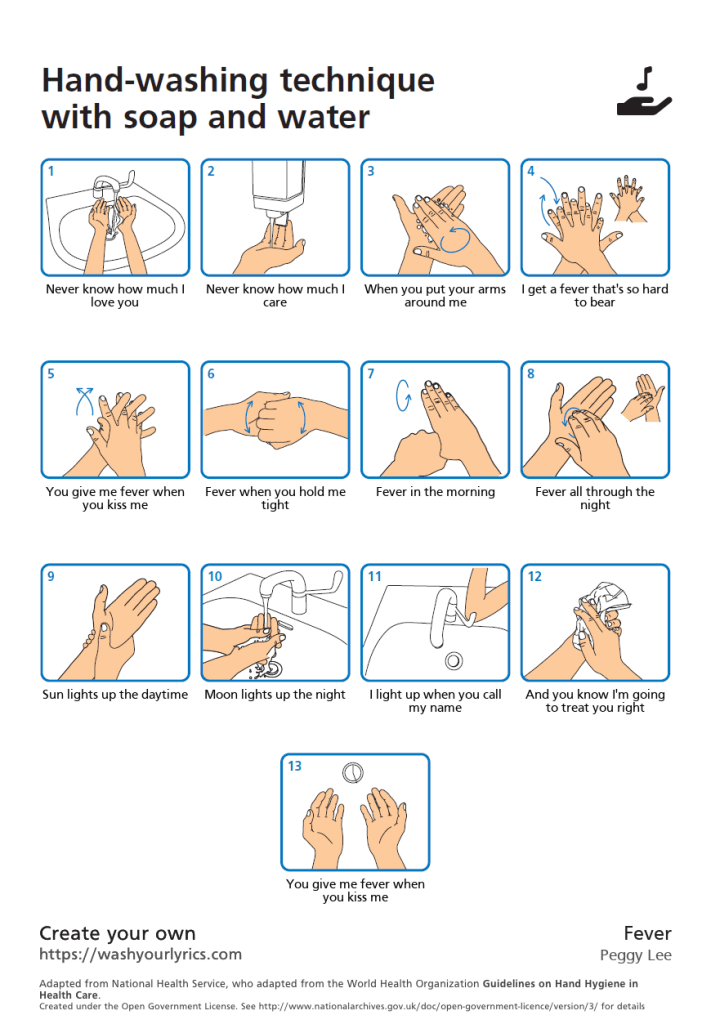
As we all know now, while social distancing and self-quarantining, the first, (repeated) middle, and last thing to do every day is wash your hands, wash your hands, and wash your hands. After riding droplets coughed or sneezed out by an infected person into your mouth–greatly mitigated by ~2 meters (~6 feet) of social distancing–the coronavirus’ favorite path into your body is from a public surface to your hands to your face. Some have noted that singing Happy Birthday twice roughly clocks the 20-30 seconds of thorough hand-washing necessary to mechanically remove viruses from your hands…but such a boring song! To sing something much cooler (and more appropriate?) while washing your hands correctly, enter a song title and artist at WashYourLyrics.com, and the site will generate a downloadable & printable “Hand-washing technique” poster with your chosen lyrics under infographics so you can wash and sing in sync. You may need to try different songs to get a desired fit: I first tried It’s the End of the World as We Know It by R.E.M., but got the intro lyrics rather than the more recognizable titular chorus. My next try worked much better: Fever by Peggy Lee

I first met US Astronaut and Navy Captain Scott Kelly while he was training in Moscow (Москва) and Star City (Звёздный городок) during my 4-year tour in Russia and Kazakhstan supporting the International Space Station (ISS). Scott’s a very cool and funny guy, definitely the sort you’d want to calmly handle a stressful situation in the air or space (or at the Volga Hotel in Moscow). A veteran of several Shuttle, Soyuz and ISS missions, he famously spent a year aboard ISS to study prolonged zero-G living over the kind of duration required for a human Mars mission someday, and later wrote the NY Times best seller, Endurance: My Year in Space, a Lifetime of Discovery. OK, Scott’s an impressive dude, but what does he have to do with coronavirus?! Hopefully very little beyond his NY Times article yesterday (21-Mar-2020): I Spent a Year in Space, and I Have Tips on Isolation to Share. Here’s a summary of his advice for being stuck at home (with a few of my comments interjected), based upon his experience being stuck in space, enticing you to read his full article:

  1. Follow a schedule for structure and normalcy, even when stuck at home. I still have my alarm set for every morning…admittedly an hour later than before since I don’t necessarily have to shave, shower, and dress for teleworking these days (teleworking is pants optional).
  2. But pace yourself, because we’re in this for the long haul, so make time for fun. I’m not sure Scott watching the 8th season of Game of Thrones twice qualifies as fun, but point taken.
  3. Go outside every day, because nature rules (forget that coronavirus is natural), and reduces stress. Even with social distancing, this is so much simpler to do on Earth than on the ISS!
  4. You need a hobby, an outlet that isn’t work or home maintenance. Scott took a digital guitar trainer and paper books to orbit (at how many $K/kg?!). I’m counting this blog as a hobby.
  5. Keep a journal, writing about your daily experiences and memories. Scott used his journal to write a popular book. Varya adores fancy Japanese paper journals, while I prefer digital apps–more searchable, cheaper, lighter, and take up far less space in my office (electrons are so tiny).
  6. Take time to connect with people remotely using your phone, tablet and/or computer. Isolation damages mental and physical health, actually lowering your immunity to viruses (oops), so this becomes more important the longer we self-quarantine.
  7. Listen to experts, not crazy internet sites, Facebook posts, YouTube videos, far right/left commentators, or even friends spewing fake remedies, cures, rumors, and bad advice. Scott recommends the John Hopkins Coronavirus Resource Center and WHO, and you should also listen to the CDC and your city & state health officials. Remember, social media like Facebook and Twitter are neither your friends nor real news, but merely entertainment, as informative and useful as pro wrestling, political propaganda, and cat videos.
  8. We are all connected, as is obvious when viewing the borderless Earth and its thin atmosphere from space, and when humans face a borderless pandemic (or alien invasion, planet-killer asteroid, etc.).
  9. Wash your hands–often, now singing along with your Fever-synched hand-washing poster!

So that’s what to do individually, but what should we as a species expect of this pandemic, and how should we fight it? With all due respect to Capt. Kelly, let’s turn to a real expert, epidemiologist Dr. Larry Brilliant (good career/name pairing; Dr. Fever would have been cooler). Brilliant helped eradicate smallpox and contain SARS (bird flu), and for many years has been arguing for a global early warning system for identifying and containing pandemics. Before consulting on the 2011 movie Contagion (now trending again in iTunes…go figure) to communicate this need to the public, he gave a prize-winning TED2006 talk, Help Me Stop Pandemics. Watch his TED Talk to learn how…

  • He helped WHO track down every case of smallpox in the world to eradicate this ancient lethal/scarring/blinding disease from the planet by 1980!
  • Early detection and early response using GPHIN helped conquer the SARS epidemic, “the pandemic that didn’t occur”, and are the keys to attacking…
  • The next big pandemic could spread worldwide in a few weeks, halt air travel, trigger global recession (or depression), cost the US economy $1-3 trillion, cause mass unemployment, and if it infects a billion people around the globe, kill up to 165 million of those according to models. He said this in 2006, but at least some of this is happening now: coronavirus spread worldwide in a month or two, airplanes are empty of passengers, markets are crashing, Congress is talking about more than $1 trillion in response/stimulus, and the infection rate continues to accelerate in the US and Europe. China curbed their infection rate by locking down large sections of the country, testing and tracing contacts of infected people. South Korea curbed their rate with rapid response including early mass testing, contact tracing and targeted quarantine. These examples show that mass testing/tracking and strict social distancing/isolation/quarantining can mitigate the spread of infections. So, perhaps we can slow it down enough to keep the peak well under a billion, at least until anti-viral drugs and vaccines for coronavirus (hopefully) are available next year.

Steven Levy–renowned tech writer/editor for Wired magazine and a host of other publications previously–published his interview with Larry Brilliant in Wired’s Science section last week (19-Mar-2020): The Doctor Who Helped Defeat Smallpox Explains What’s Coming. Here are a few take-aways from Steven’s interview with Larry, which you should read in its entirety when you get a chance:

  • Dr. Brilliant describes coronavirus as “the most dangerous pandemic in our lifetime,” but believes we can beat it with quick, strong action including a lot more testing.
  • The term novel preceding coronavirus simply means it’s new, so humans have no immunity to it (yet) and everyone is at risk until we survive infection and disease and (assuming it acts like other viruses) develop immunity, and/or develop a vaccine for worldwide distribution, likely next year.
  • He applauds current state government directions–self distancing/isolation, closing schools and some businesses, canceling events and gatherings–while criticizing the early slowness, denial and misinformation from some federal government officials lacking expertise.
  • Slowing down or flattening the curve does not decrease the total number of cases (the area under the curve), but rather postpones many of them (1) to avoid overwhelming hospital capacity (as in Italy), and (2) until we get a vaccine in 12-18 months.
  • Epidemiologist “Gold Ring” = combination of two factors to create herd immunity (70-80%):
    1. Enough of us have caught and survived the COVID-19 disease to become immune
    2. Vaccine developed, tested, mass produced and globally distributed
  • It will be hard for the US to follow the Chinese model of strict national lockdown, but we should be able to follow the South Korean model, including rapid mass testing to clearly understand where the virus really is and how fast it is spreading or receding in those areas.
  • US coronavirus response should be centralized under an experienced person like “Ebola Czar” Ron Klain, perhaps retitled Covid Czar, with the respect of public health and political communities. Dr. Tony Fauci of the NIH is the closest we have to that so far.
  • If you’re not worried, you’re not paying attention, but don’t be scared. We can slow down the virus and increase the odds of getting a vaccine or at least a prophylactic antivirus medication in time to avoid a much bigger disaster. This is not the zombie apocalypse. (Whew!)
  • N95 mask pores are 3 times wider than the virus. However, these masks still provide significant protection. Think of a huge bunch of football players trying to rush through a single door–a few will make it, but slowly, and many won’t. So, we need to get many more masks to health professionals, as they do help a lot.
  • Before we can beat this thing and the world starts looking normal again, we need 3 things:
    1. Measure virus distribution (mass statistically designed testing program)
    2. Vaccine or antiviral treatment that works
    3. Large numbers of people are identified as immune (herd immunity), especially in public professions that make us comfortable returning to schools, hospitals, etc.
  • Brilliant is encouraged by seeing civic engagement and volunteerism in the face of pandemic, especially among our youth (did he miss Spring Break videos showing thousands of idiots/carriers crowding beaches?!), and a huge influx of medical professionals putting in more hours than they’ve ever worked before.
  • Coronavirus is an equal opportunity infector that does not see red or blue states or pink or red hats. So, perhaps we’ll come out of this seeing ourselves more united, more alike than different (with less denial and ignorance of science and true expertise!).

(Next post: After Pandemic)

Apollo 11 in Real Time

To join in celebrating the 50th anniversary of the first Moon landing, you can follow the Apollo 11 mission in real time at https://apolloinrealtime.org/11/…click on the link and then the blue NOW button to jump back in time exactly 50 years to the second. The site shows mission status and actual mission communications (audio & transcripts) and images as they happened half a century ago. As I type, the crew–Armstrong, Aldrin and Collins–are in the Command Module, docked to the Lunar Module, nearing the Moon, and are about to enter lunar orbit, where they’ll prepare for the landing attempt tomorrow, July 20th, 1969. At this point, successful landing and return to lunar orbit by Neil and Buzz in the Lunar Module are still uncertain, and a mission abort or worse–catastrophic failure and loss of crew–is a very real possibility. Tension mounts as the lunar surface draws near…

While monitoring Apollo 11 in real time, look for 50th anniversary events in your town this weekend. Here in Houston, there will be public events in Discovery Green downtown and at Space Center Houston in the Clear Lake area on Saturday. NASA listed some nationwide events in an Apollo 11 50th Anniversary press release. Cool stuff for us space geeks!